Book a demo
For UK delivery companies

Run every round from one screen.

Live map, routes, rota, fleet, customers and timesheets in the office, a simple app your drivers use on their own phones, and tracking links for your customers. Set up for the way you deliver.

  • Works on any phone, no app store
  • Live traffic arrival times
  • Proof of delivery built in
  • Customer tracking by email
  • Your logo and colours
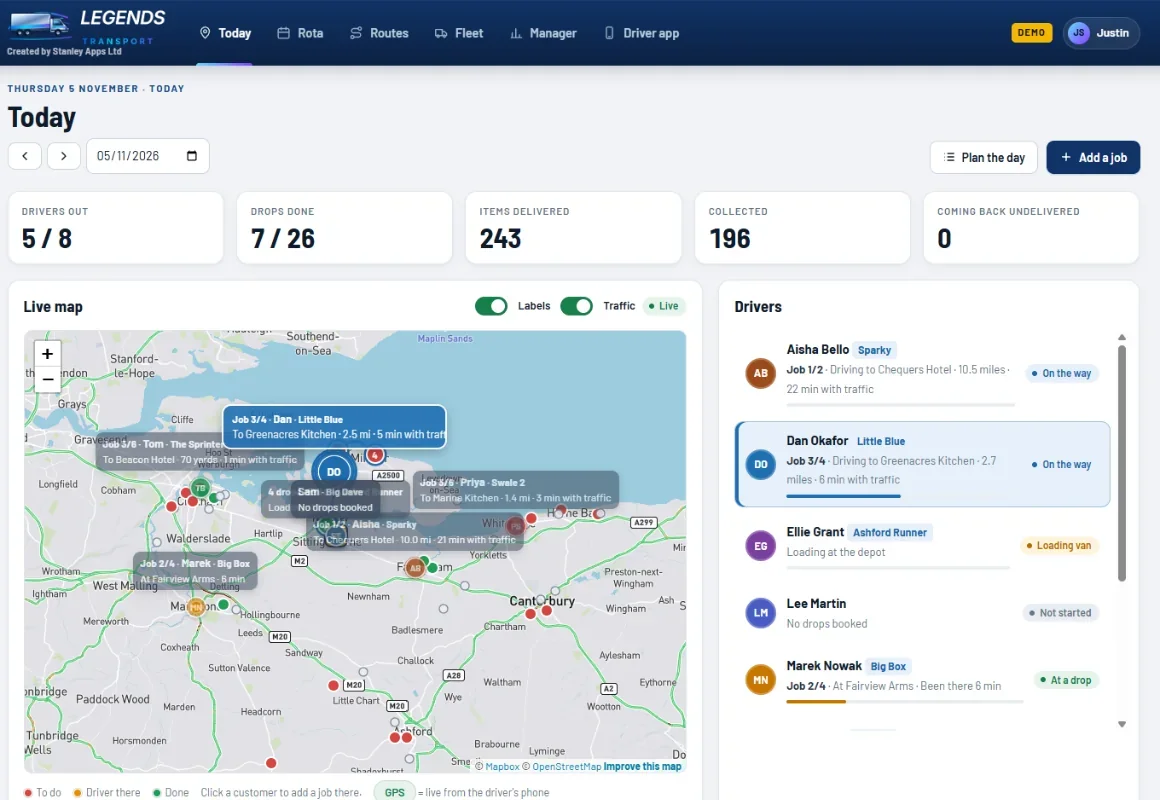
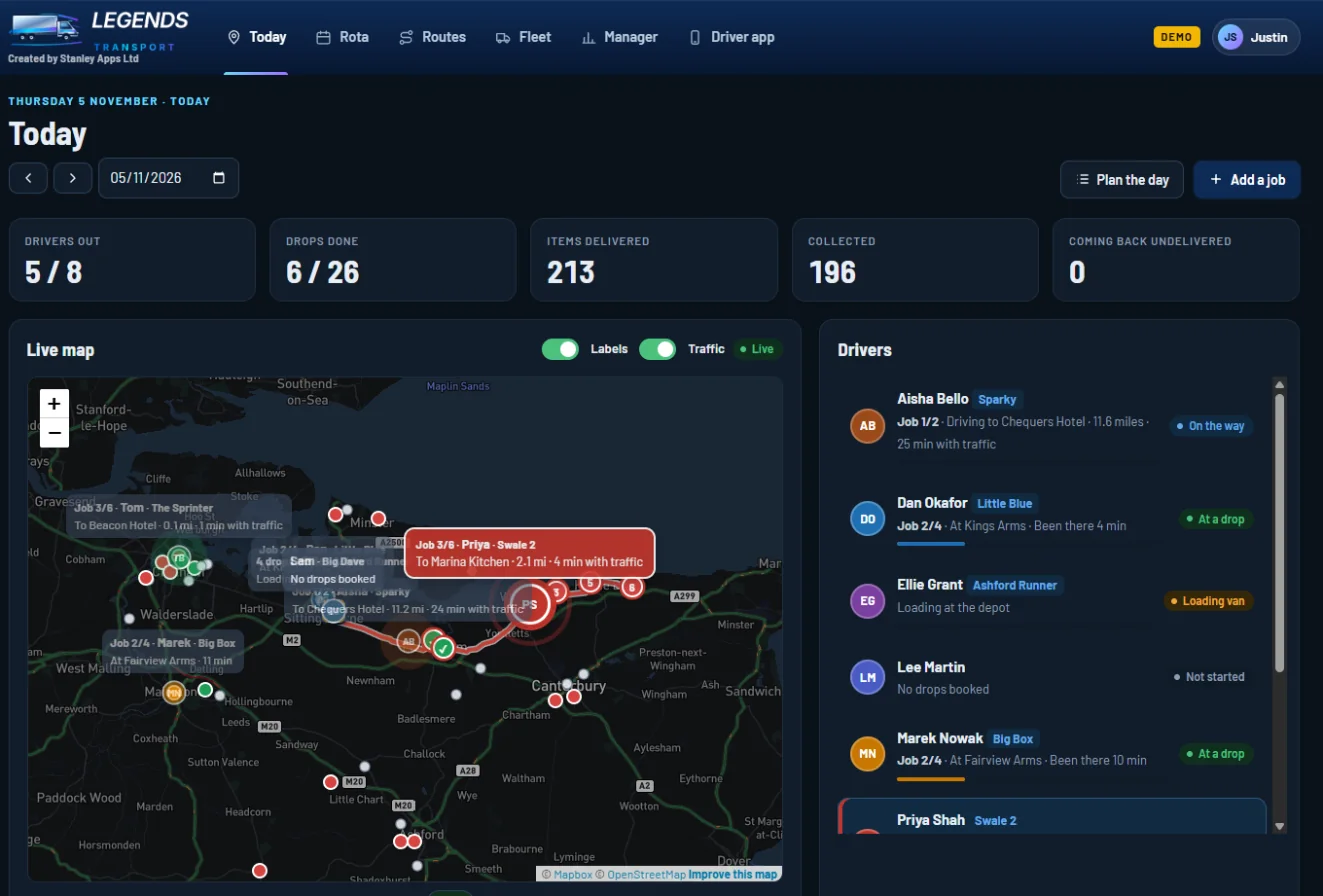
Today · live map
The Today screen: live map of every van with arrival times, and the list of drivers
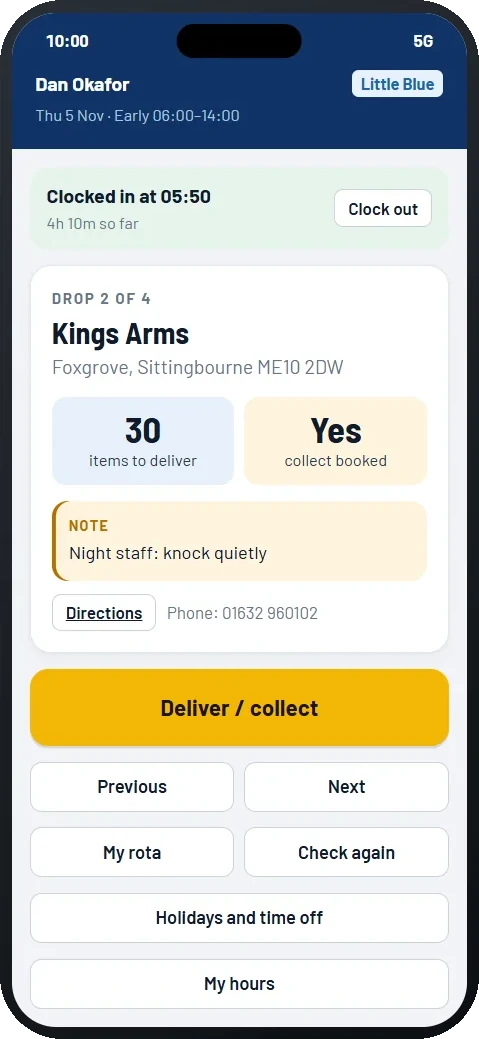
The driver app on a phone

Set up for the deliveries you do

Parcels and couriersParcels, collections, safe place, photo proof
Linen and laundryItems out, items back, stock left with each customer
Food and drink wholesaleCases, empties back, chiller temperatures
Building and trade suppliesPallets, sites, site safety notes, photo proof
Something elsePick your own words, checks and proof

Choosing a type fills in sensible settings. Change any of them later: the words you use, proof of delivery, what drivers count and which checks they do.

Today

See every van, live

Everything happening on today's rounds, on one screen. Click a driver and their van lights up on the map, with their whole round drawn along the roads.

  • Live map showing every van from the driver's phone GPS
  • Labels like "Job 3/6 · To Marina Kitchen · 2.1 mi · 4 min with traffic"
  • Arrival times with live traffic, and a Traffic switch that colours the roads green, orange or red
  • Drops coloured red (to do), orange (driver there, with how long) and green (done)
  • Today's totals: drivers out, drops done, items delivered and collected, anything coming back
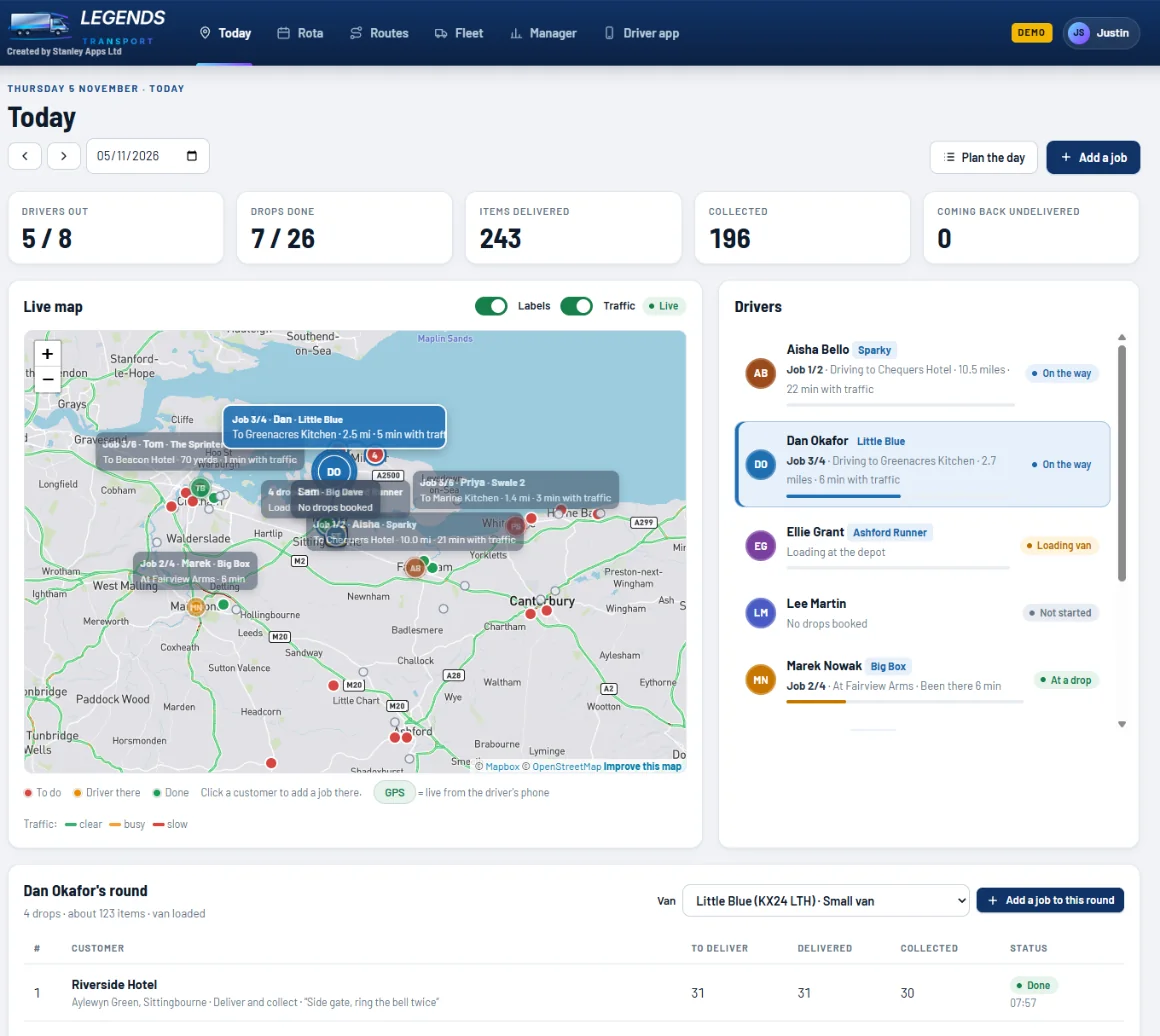
  • Each driver's round as a list: what's planned, delivered, collected and the time it was done
  • Change a driver's van, look back at any day, and plan tomorrow's rounds
  • See the signature and photo for any finished drop
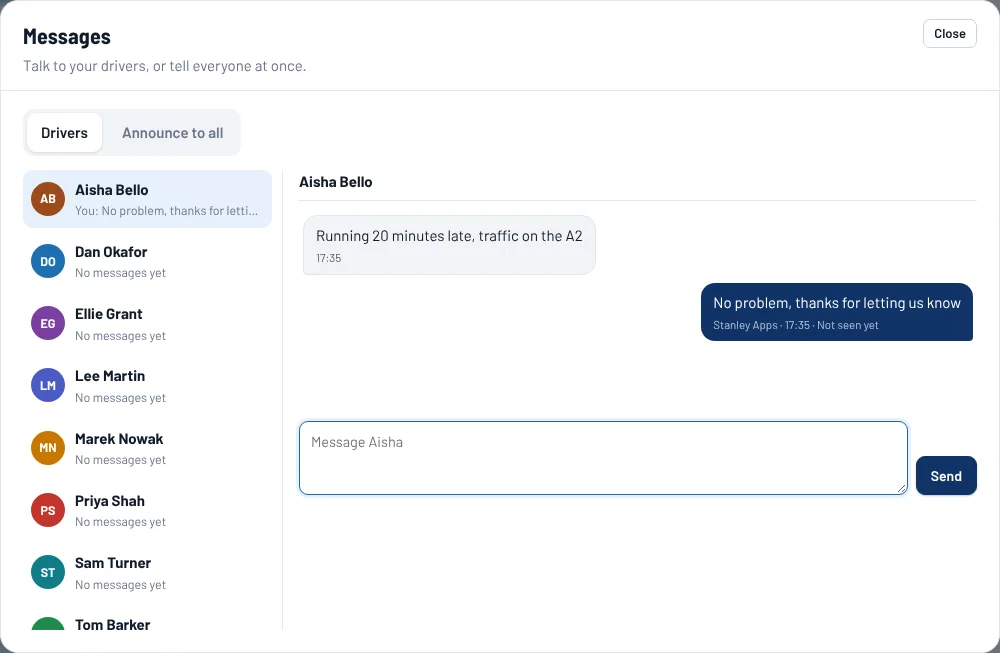
  • Message any driver, or announce to every driver at once (road closures, changes), and see who has read it
Today screen with the live map and drivers list
The same screen in dark mode, with one driver's route highlighted

Light and dark mode both included. It follows the setting on each computer or phone.

Mid-shift changes

Add a job in seconds, to the right driver

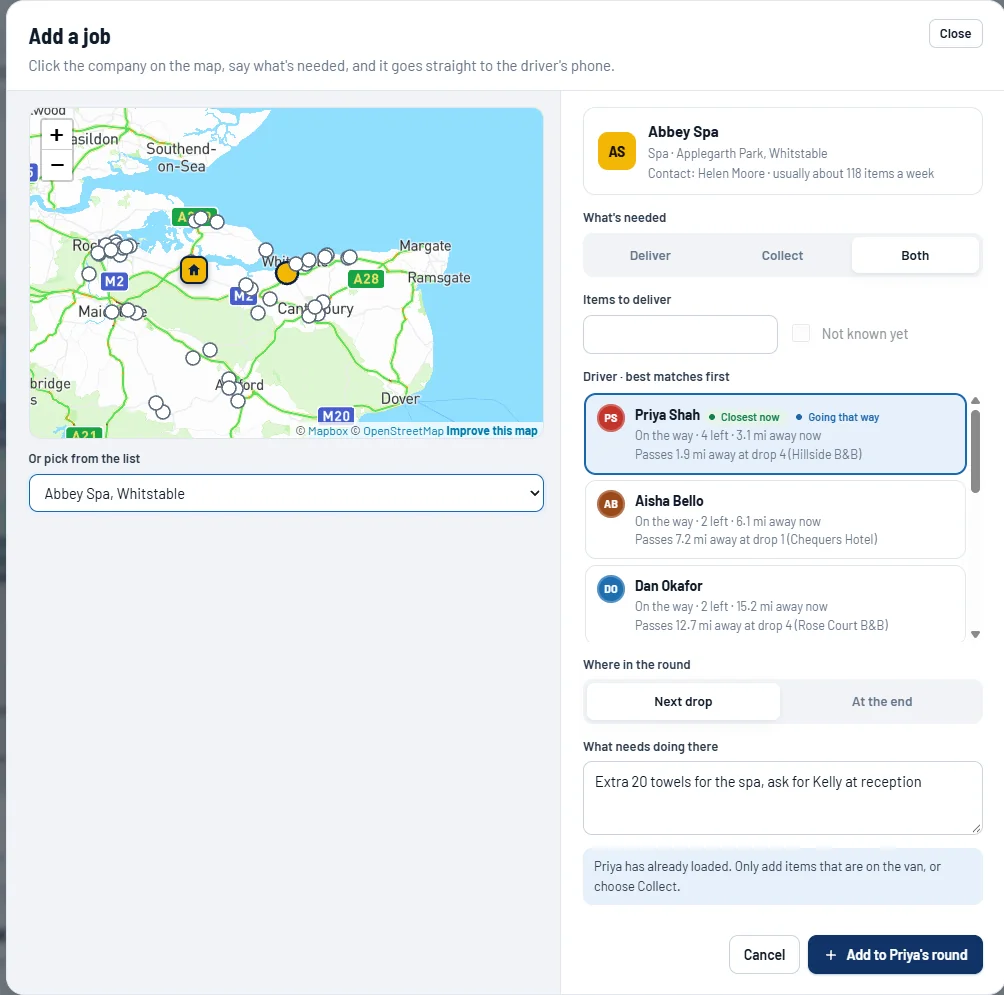
A customer rings with an extra order? Click them on the map and say what's needed. The hub suggests which driver should take it.

  • Pick the customer on the map or from a list
  • Deliver, collect or both, with how many, or "not known yet"
  • Driver suggestions: "Closest now" and "Going that way", showing how close each round passes
  • Put it as their next drop or at the end of the round
  • Add a note, for example "ask for Kelly at reception"
  • It appears on the driver's phone straight away, with a "New job from the office" banner
  • Message the driver to let them know, or announce to all drivers about a road closure
Add a job window with map, driver suggestions and notes
Messages window: a driver says they're running late and the office replies

Messages with drivers, and announcements to everyone, from the Today screen.

Routes

Build your routes, then let the hub find the best order

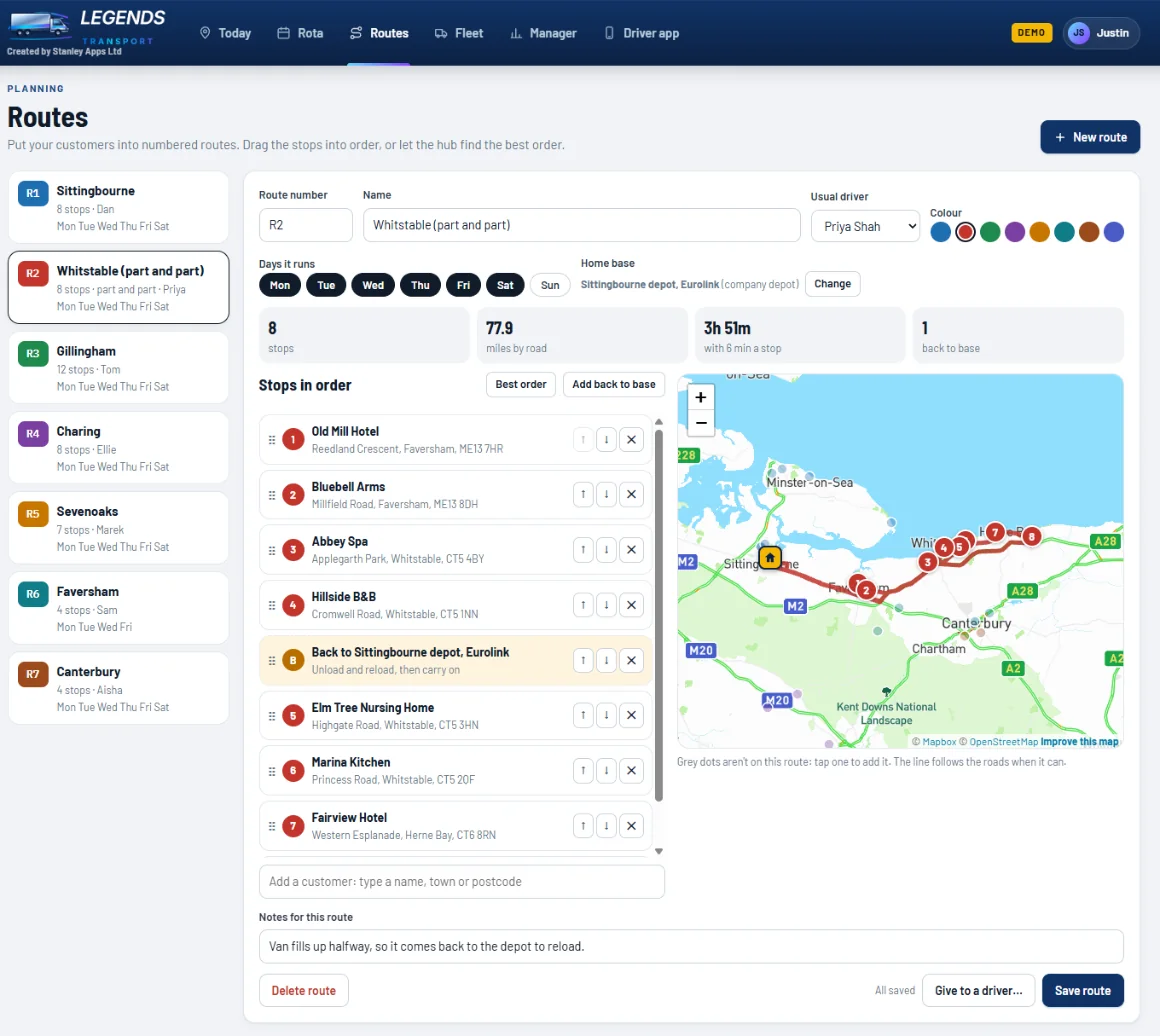
Give each route a number, add the customers it covers, and drag the stops into order. The line follows real roads and redraws instantly as you move things.

  • Numbered routes (R1, R2…) with their own colour, days and usual driver
  • Drag stops into order, or press Best order to save miles
  • Real road miles and drive time for the whole route
  • Back to base stops for part-and-part rounds, when a van needs to reload
  • A home base for each route, if it runs from somewhere other than your main depot
  • Grey dots show customers not on this route: tap one to add it
  • Give a route to a driver for any day, and it's on their phone in that order
  • Or let Auto-plan share out a whole day for you
Routes screen with numbered routes, stops in order and the road route on a map
Auto-plan (beta)

Share out a whole day's drops in one click

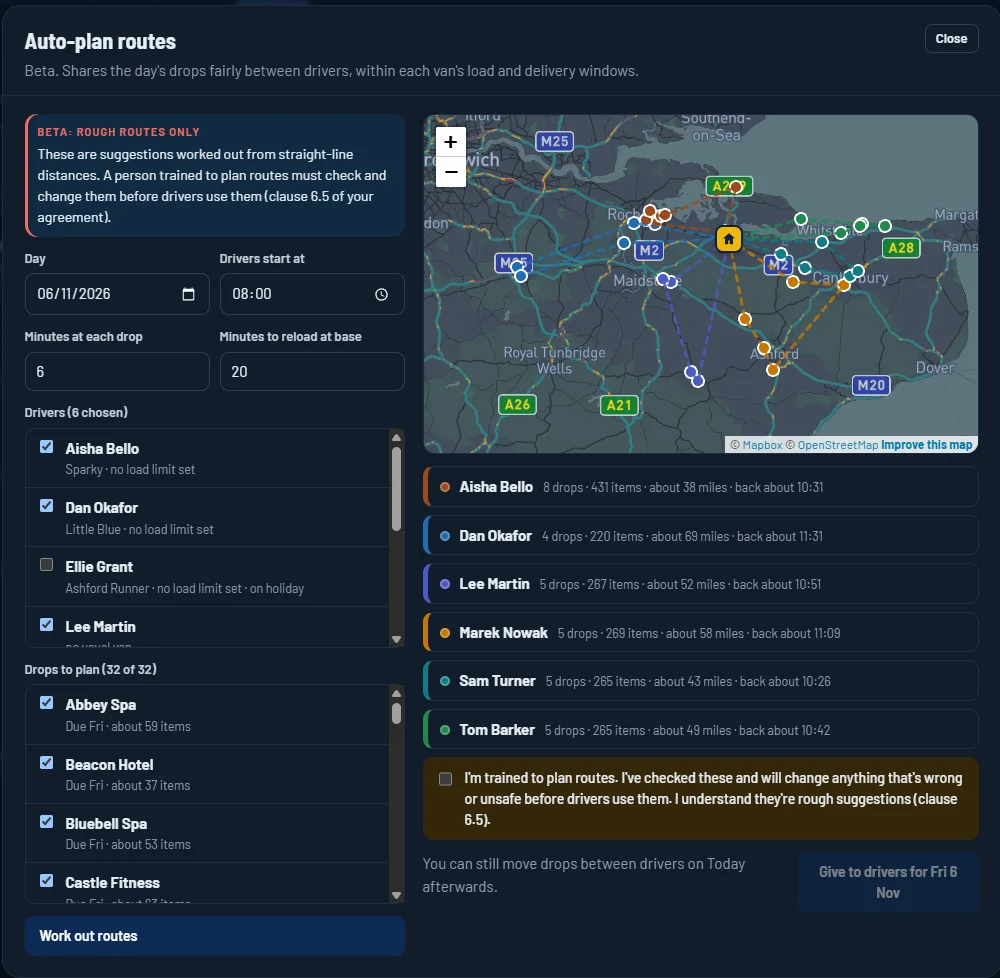
Pick the day and the drivers. The hub splits the drops fairly between vans, puts each round in a sensible order and shows it on the map before anything is sent.

  • Shares drops fairly, giving smaller vans less
  • Keeps within each van's load limit, with trips back to base to reload
  • Respects customers' delivery windows, for example 8am to 11am
  • Leaves out drivers who are on holiday
  • Shows miles and a "back about" time for every driver
  • Nothing goes to drivers until a trained planner has checked and ticked it
Auto-plan window sharing a day's drops between six drivers, shown on a map

Beta: rough routes for a person to check, not a replacement for your planner.

Rota

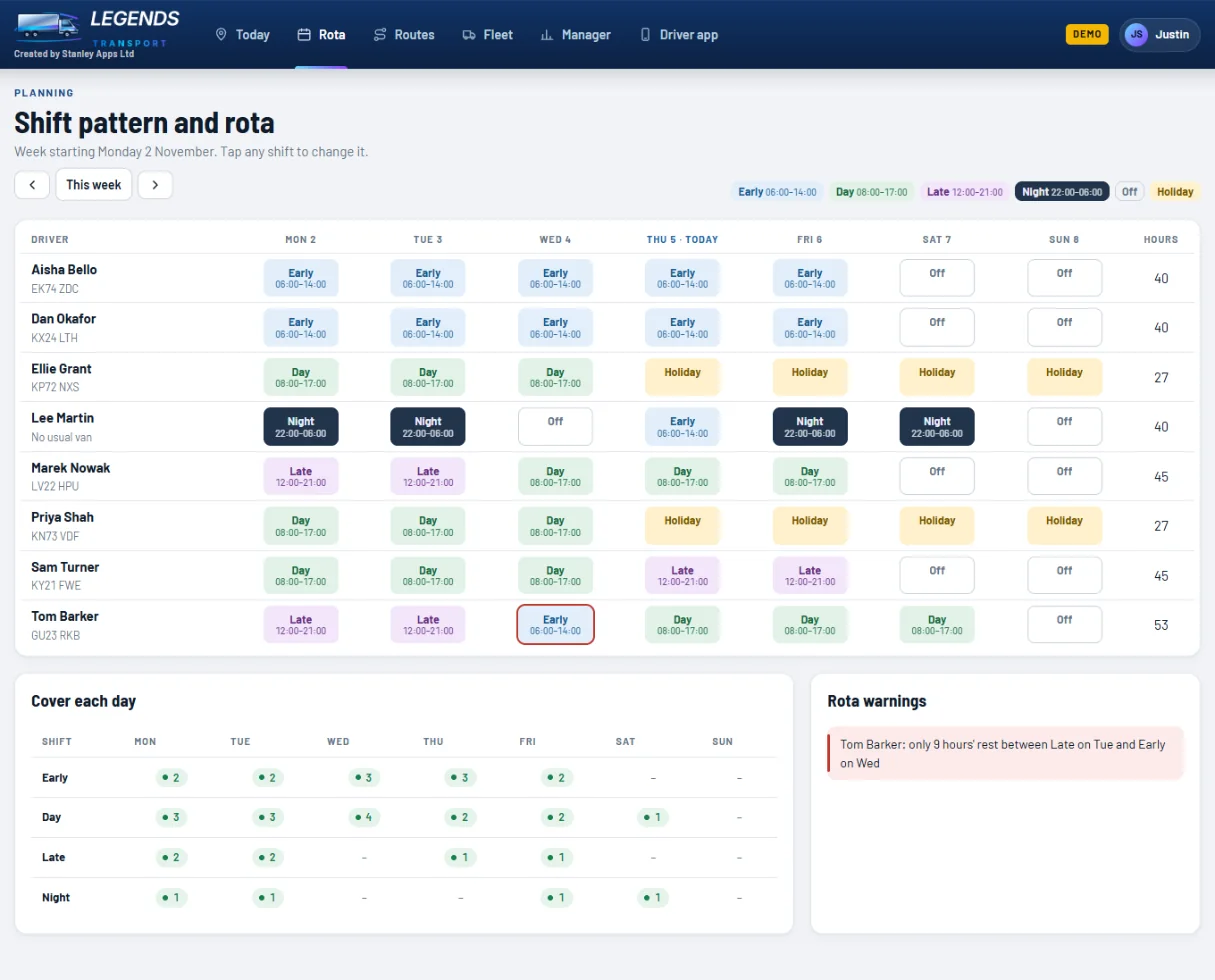
Shifts for the week, at a glance

Tap any shift to change it. The hub checks you've got cover every day and warns you about short rest breaks.

  • Early, Day, Late, Night, Off and Holiday shifts, colour coded
  • Weekly hours for each driver
  • Cover each day: how many drivers are on each shift
  • Rota warnings, for example "only 9 hours' rest between Late and Early"
  • Booked holidays show on the rota automatically
  • Drivers see their own rota on their phone
Weekly rota with shifts, cover and warnings
Fleet

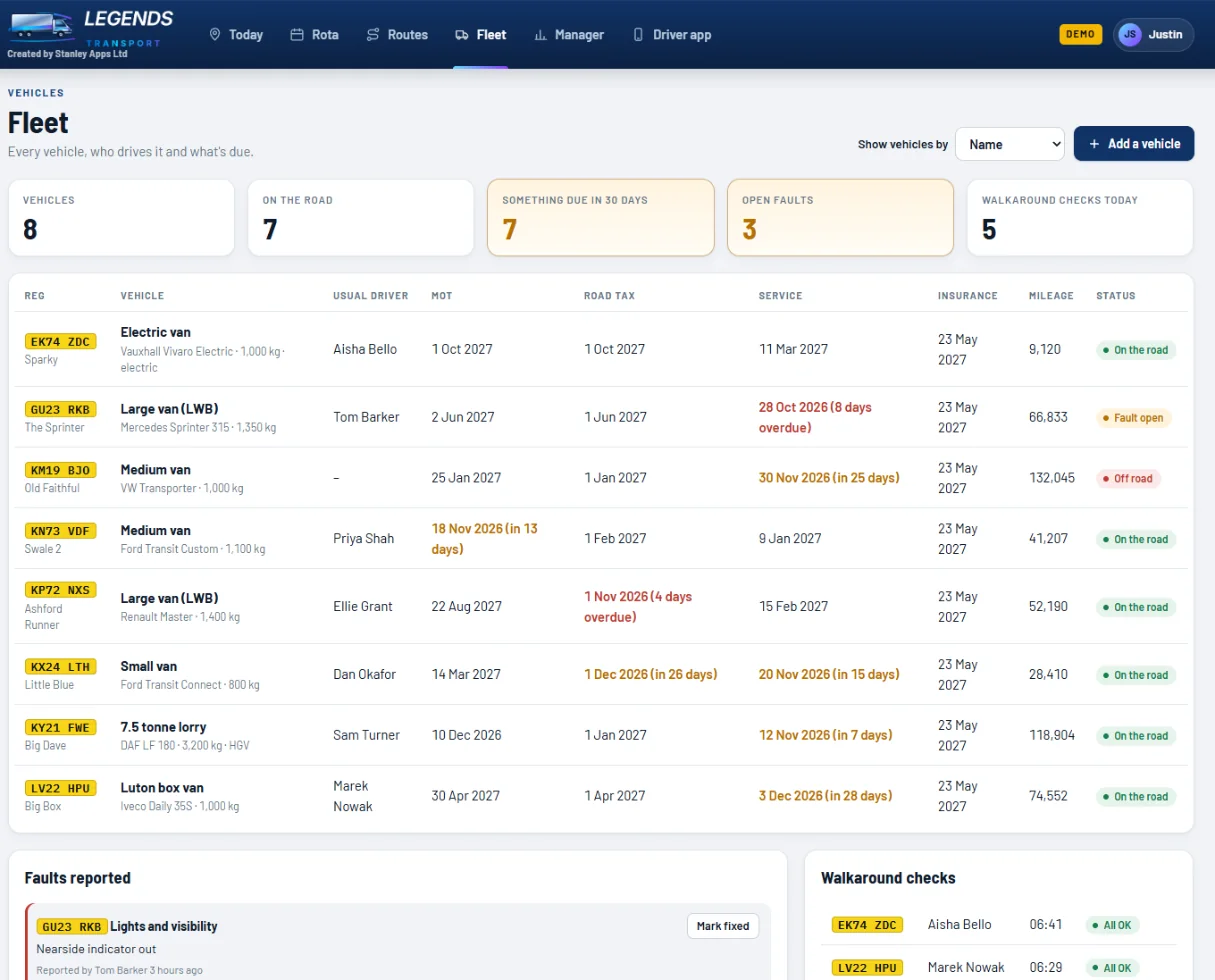
Every vehicle, and what's due

Never miss an MOT, tax or service again. Faults from the drivers' walkaround checks land here as they happen.

  • Vans and lorries with registration, an optional name ("Little Blue") and usual driver
  • Show vehicles by name or registration across the hub
  • MOT, road tax, service and insurance dates, turning orange when due and red when overdue
  • Mileage kept up to date from the drivers' checks
  • Faults reported by drivers, with a Mark fixed button
  • Safety faults take the van off the road straight away
  • Today's walkaround checks: who checked which van, and when
  • Electric vans and lorries (HGV) flagged, so drivers get the right checks
  • Tachograph downloads for HGV drivers and lorries, with reminders when a driver card (28 days) or vehicle unit (90 days) is due
  • Compliance pack: every check, defect, repair, licence check, timesheet and tachograph file in one download, ready if DVSA asks
Fleet list with due dates, mileage, faults and walkaround checks
Customers

Know every customer, and how they like it done

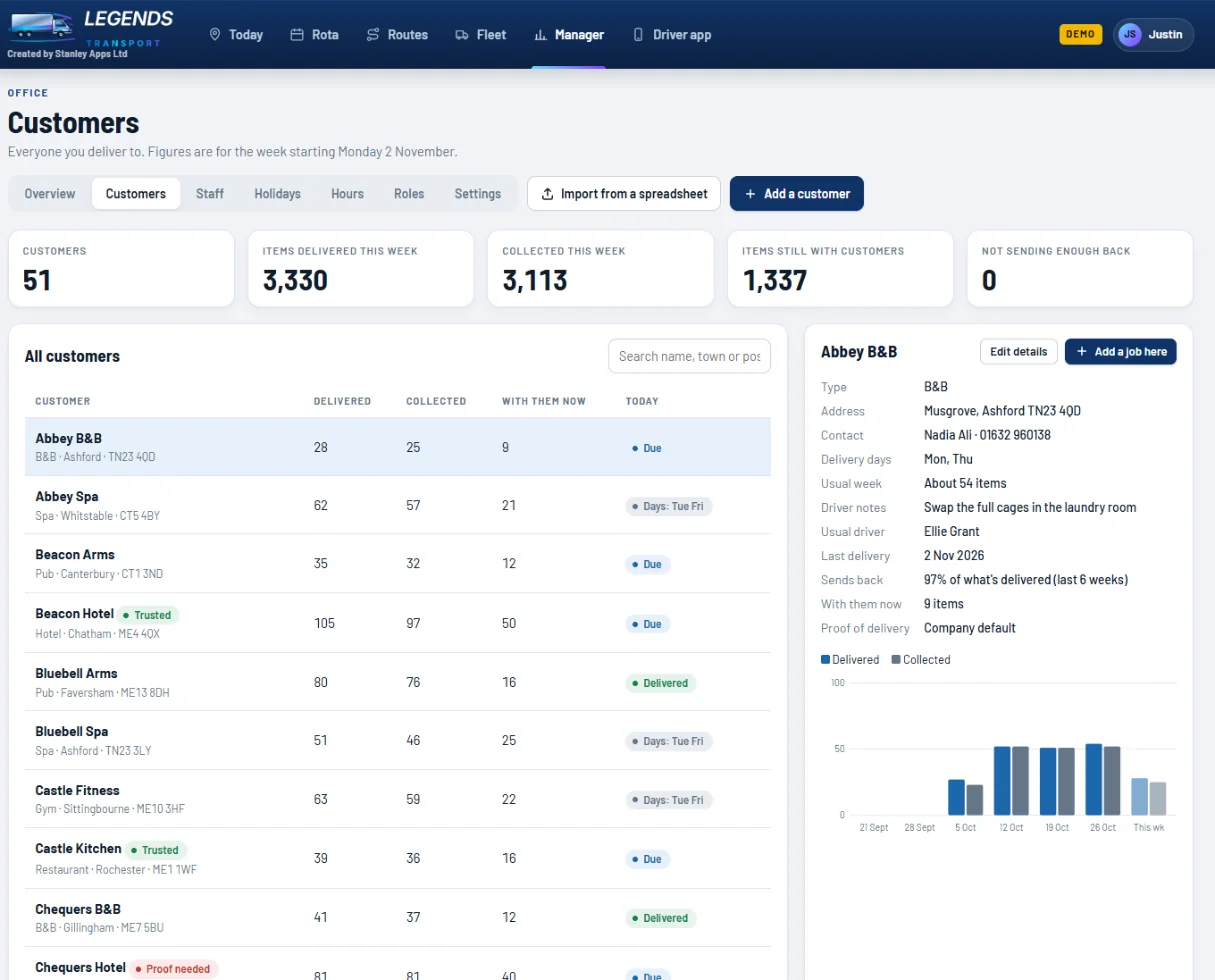
Everyone you deliver to, with what they've had, what they've sent back, and how they want proof of delivery.

  • Delivered, collected and still with them this week
  • A six-week chart for each customer, and the share they send back
  • Delivery days, usual amounts, contact and notes for drivers
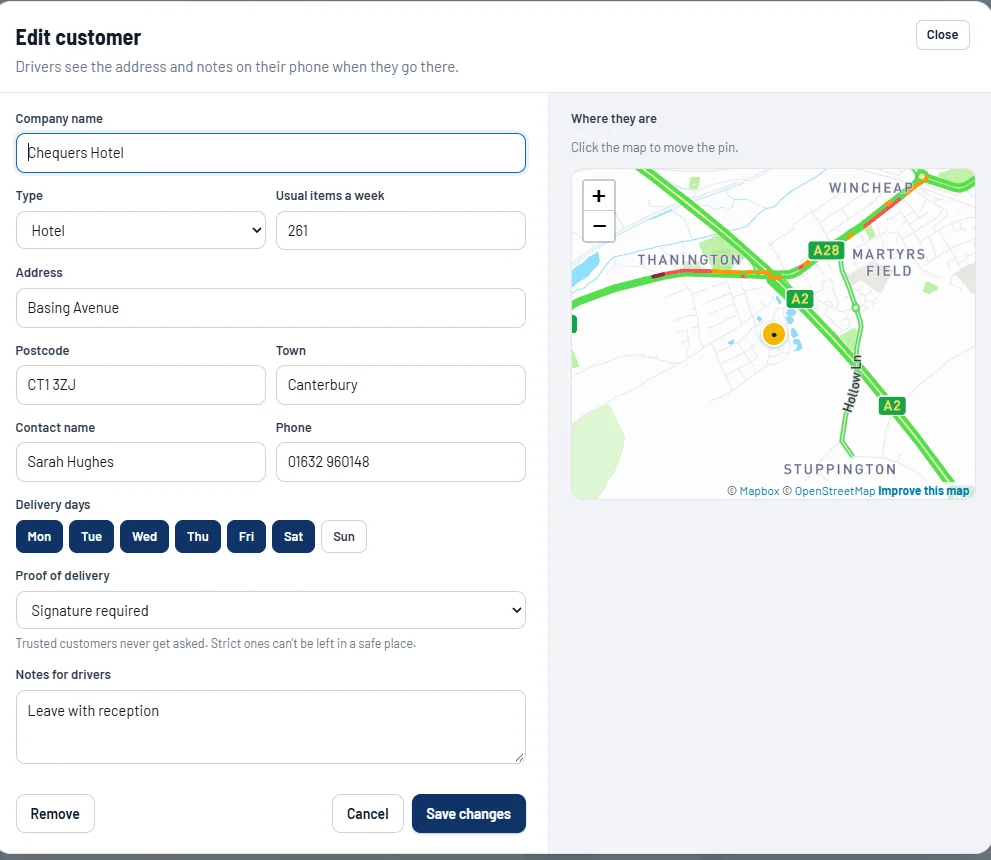
  • Proof of delivery per customer: mark regular customers as Trusted so they're never asked, or ask others for a signature, a photo or both
  • Site safety notes that drivers must tick before delivering
  • Add one with a postcode lookup and map pin, or import a spreadsheet
  • Tracking switch on every customer, plus their email for delivery updates
  • Delivery windows and star ratings on each customer
  • Add a job to any customer from their page
Customers list with totals and one customer's weekly chart
Editing a customer, with proof of delivery and map pin
Customer updates

Your customers know when you're coming

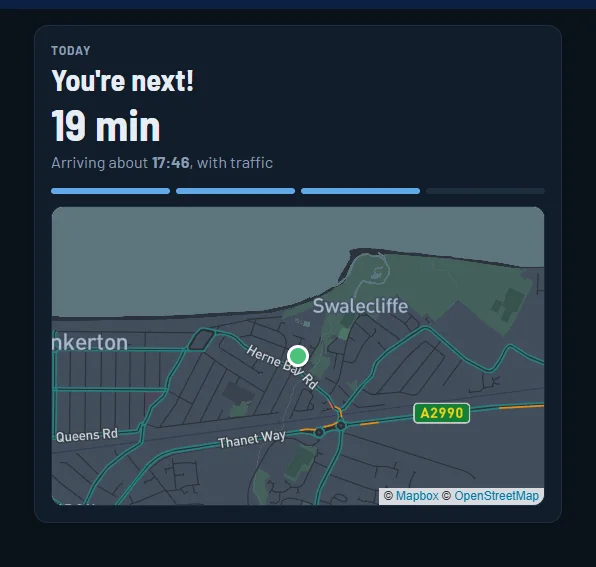
When the driver sets off, the customer gets an email with a tracking link. No texts to pay for, and no app for them to download.

  • "Your driver is on the way" email with a live tracking link
  • The van shows on the map only when they're the next drop, so drivers' other stops stay private
  • Arrival time with live traffic, and how many stops before theirs
  • "Delivered" email with the time and who signed
  • Star ratings and comments from customers, shown against each delivery
  • The link stops working 7 days after delivery
  • Switch tracking on or off for each customer with one tap
The customer's tracking page: You're next, 19 minutes, with a map

What your customer sees when they open the link.

Manager

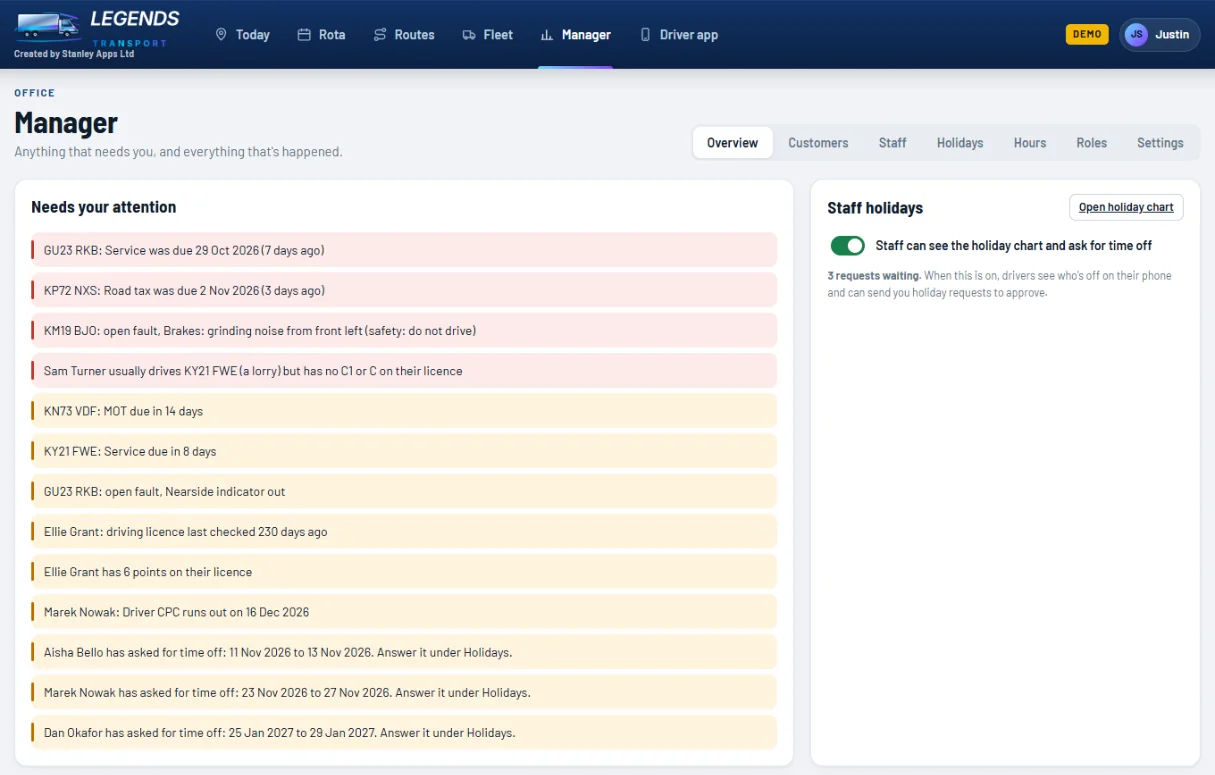
Anything that needs you, in one list

The hub keeps an eye on your vehicles, licences and requests, so nothing slips through.

  • Overdue and upcoming MOT, tax and services
  • Open vehicle faults, with safety faults first
  • Licence checks that are out of date, points, and Driver CPC end dates
  • A warning if someone usually drives a lorry they're not licensed for
  • Holiday requests waiting for an answer
  • An activity log of everything that's happened: drops, checks, changes and who made them
Manager overview with things that need attention
Staff

Logins, licences and holiday left

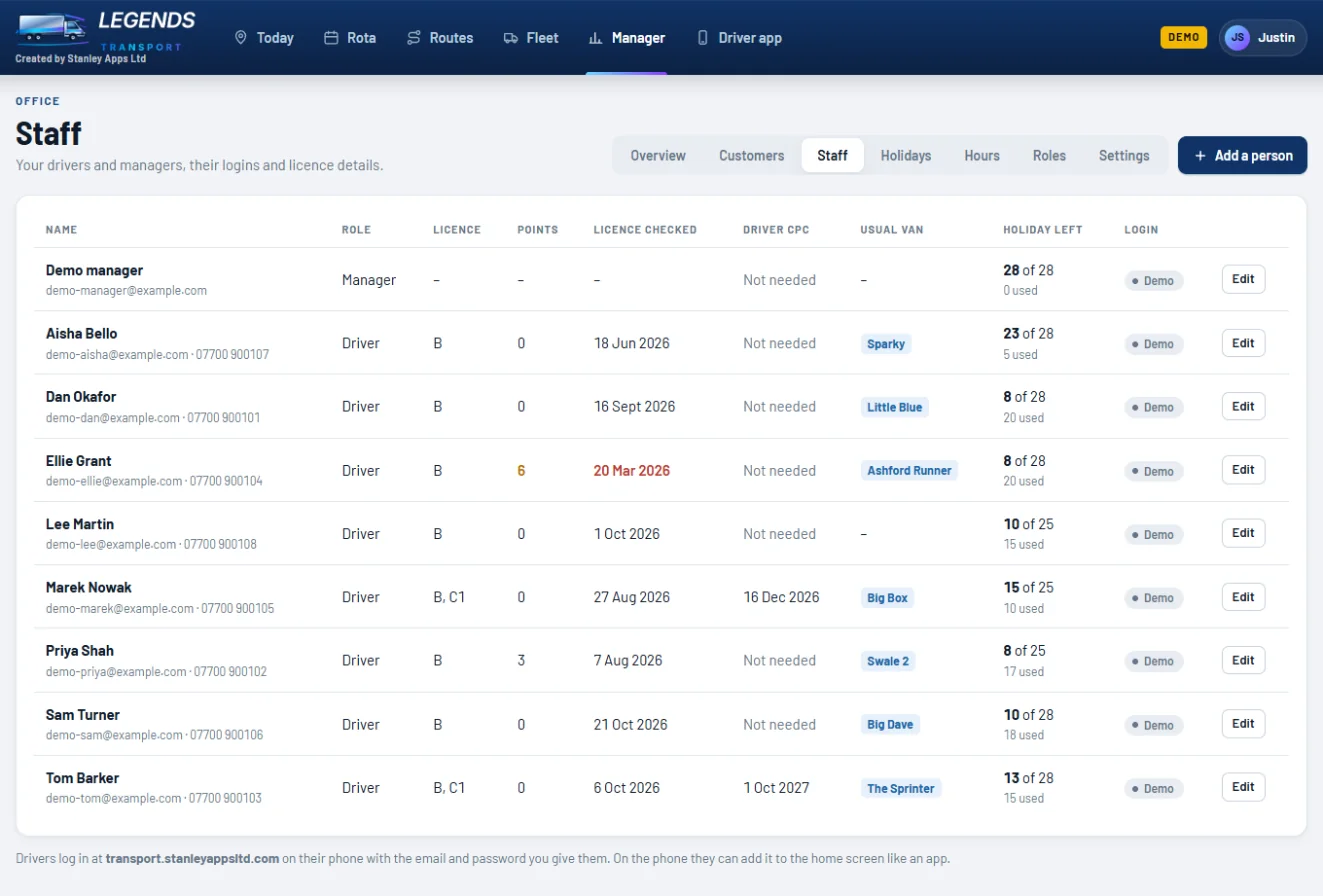
Add drivers and office staff, give them a login, and keep their licence details in one place.

  • Everyone gets their own login. You see a temporary password once to pass on
  • Licence categories, points, the date you last checked their licence, Driver CPC
  • Their usual van
  • Holiday allowance, with days used and left worked out for you
  • Reset a password or switch a login off in one tap
Staff list with licences, vans and holiday left
Holidays

Who's off, and when

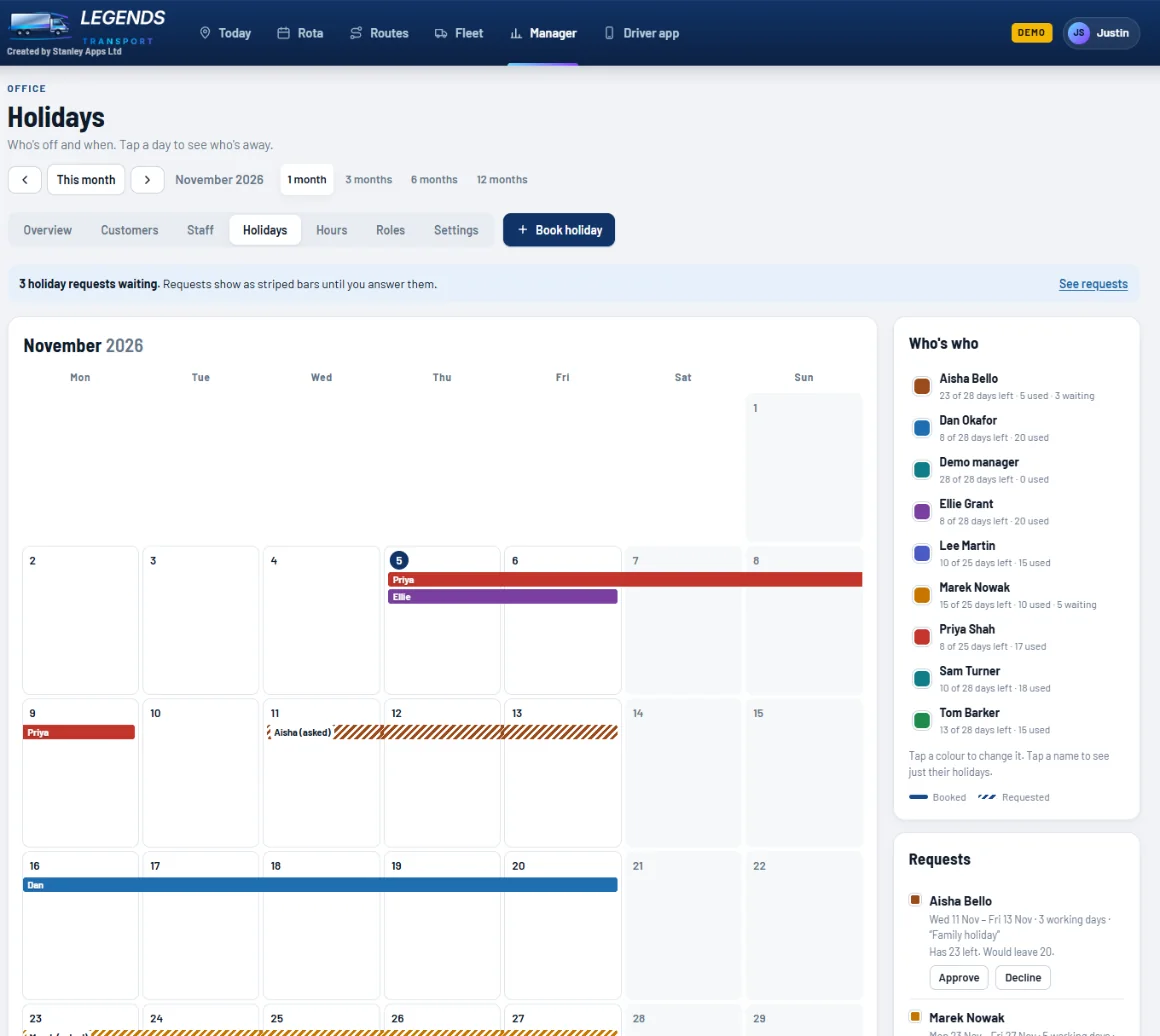
A holiday chart everyone can understand. Drivers can ask for time off from their phone, and you approve it in one tap.

  • 1, 3, 6 or 12 months on screen
  • Each person in their own colour, with a who's who list
  • Tap a day to see who's away
  • Allowances that count down automatically as holidays are booked
  • Requests show as striped bars until you approve or decline them
  • Switch on staff access so drivers can see the chart and ask for time off
Holiday calendar with coloured bars and requests
Hours

Timesheets that fill themselves in

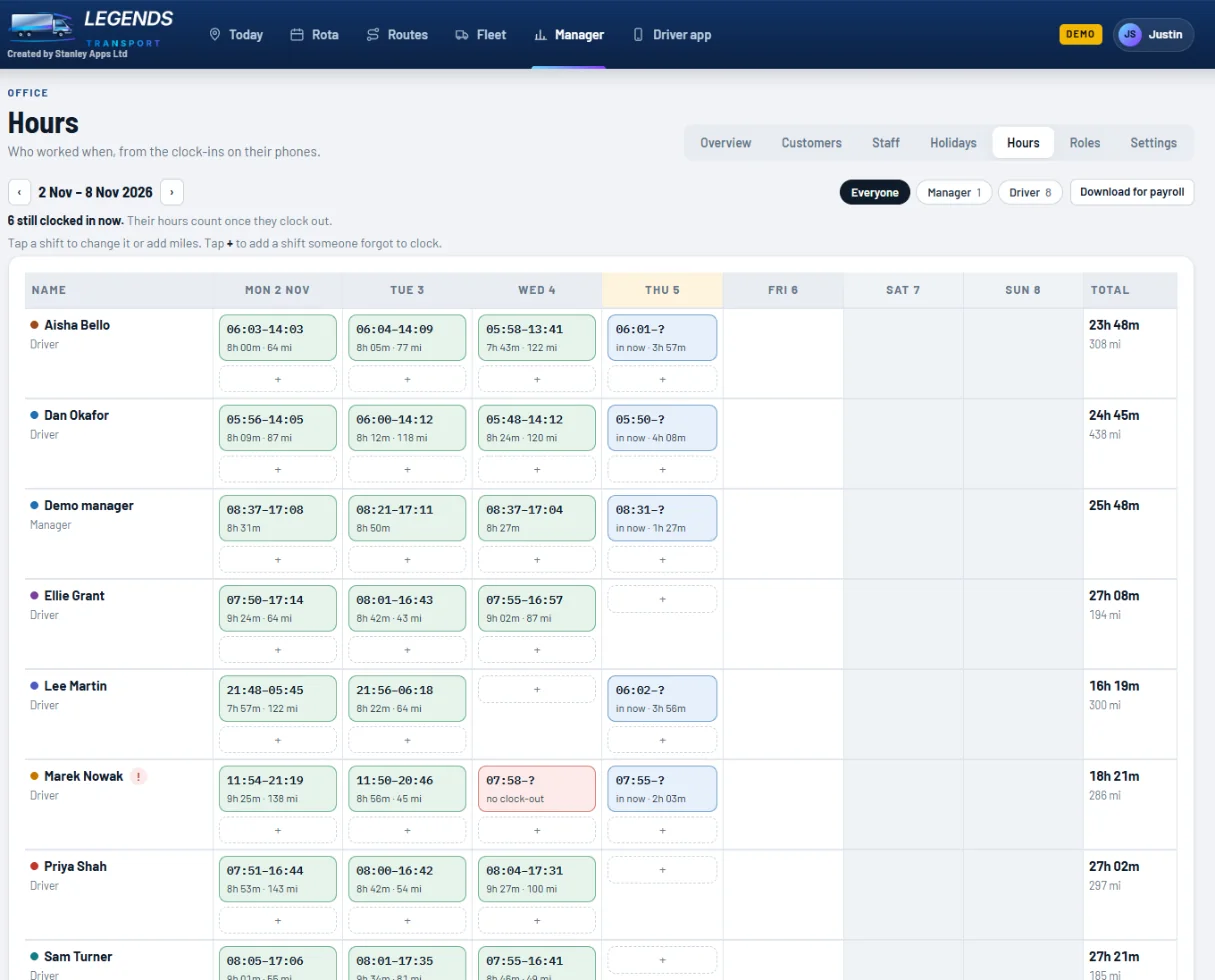
Drivers clock in and out on their phone (their vehicle check clocks them in too). You get a weekly timesheet ready for payroll.

  • Every shift with clock-in, clock-out, hours and miles
  • Who's clocked in now, and who forgot to clock out (shown in red)
  • Tap a shift to correct it or add miles. Tap + to add a missed shift
  • Show everyone, or just one role
  • Download for payroll as a spreadsheet
  • Drivers can see their own hours on their phone
Weekly hours grid with clocked shifts
Roles

Everyone sees only what they need

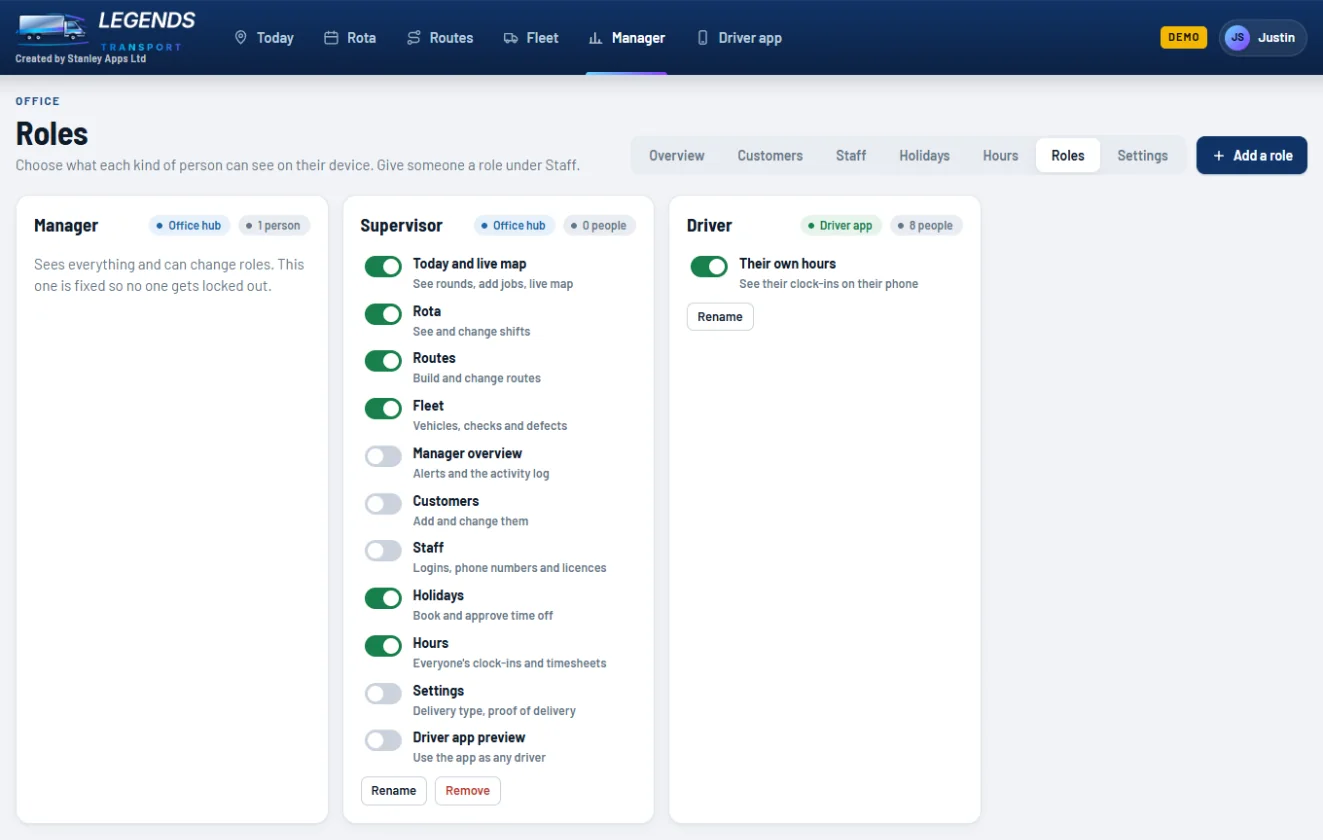
Make roles like Supervisor, Transport Planner or Warehouse, and switch on exactly which parts of the hub each one can use.

  • Roles for the office hub, or for the driver app
  • Switch each area on or off: live map, rota, routes, fleet, customers, staff, holidays, hours, settings
  • Staff contact details and licences stay hidden from roles without Staff access
  • A fixed Manager role that can do everything, so nobody gets locked out
Roles screen with switches for each part of the hub
Access log

See who looked at what, and when

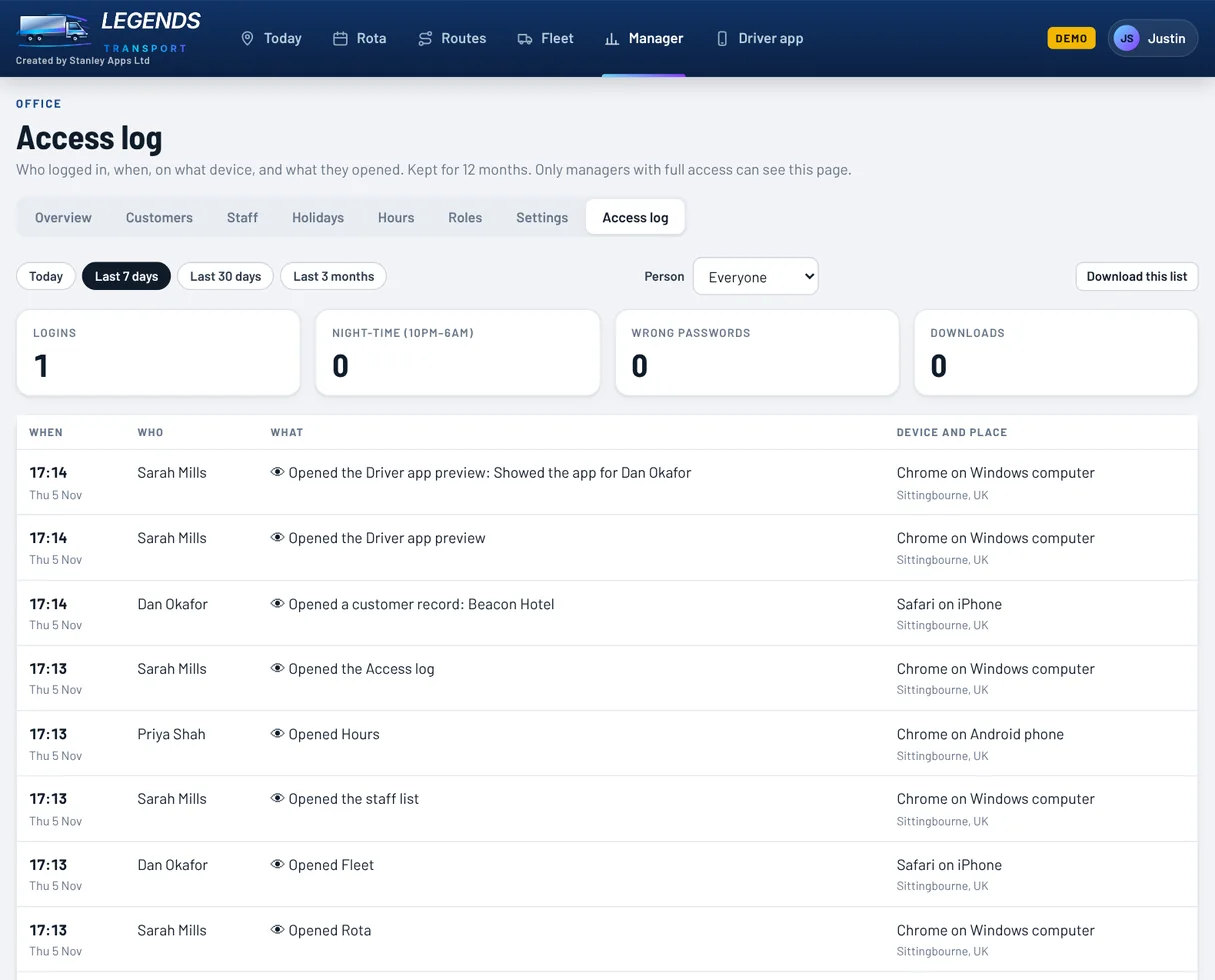
If customer details ever get out, you can check who opened them. Every login and every page opened is kept for 12 months.

  • Who logged in, when, and on what device
  • Which customers, staff records and proof of delivery they opened
  • Night-time activity (10pm to 6am) and wrong passwords counted up front
  • Filter by person or date, and download the list
  • Only managers with full access can see it
Access log listing who opened which page, on what device
Settings

Your words, your rules

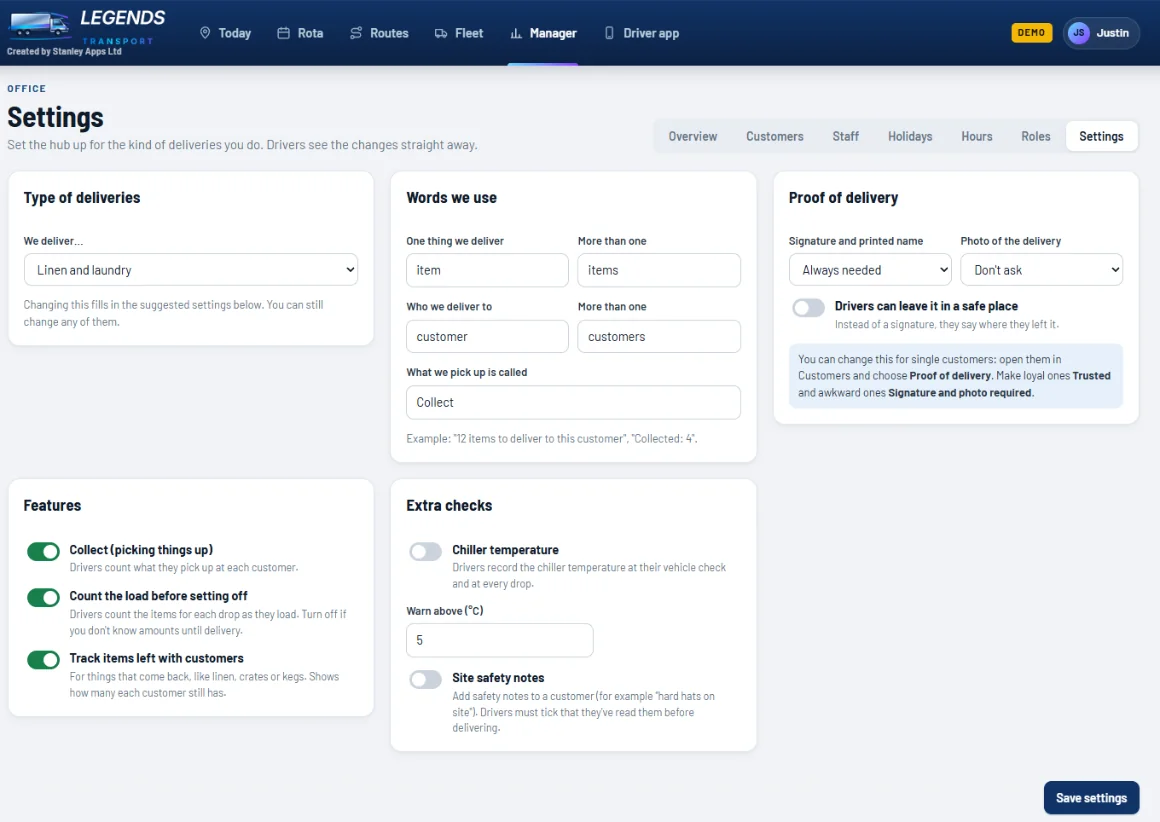
Call them parcels, cases, pallets or items. Customers or sites. Collections or returns. The whole hub and driver app change to match.

  • Choose your type of deliveries, then change anything you like
  • The words you use, everywhere
  • Proof of delivery for everyone: signature, photo, and whether a safe place is allowed
  • Turn on or off: collections, counting the load, tracking stock left with customers
  • Chiller temperatures at the vehicle check and every drop, with a warning above your limit
  • Site safety notes drivers must read before delivering
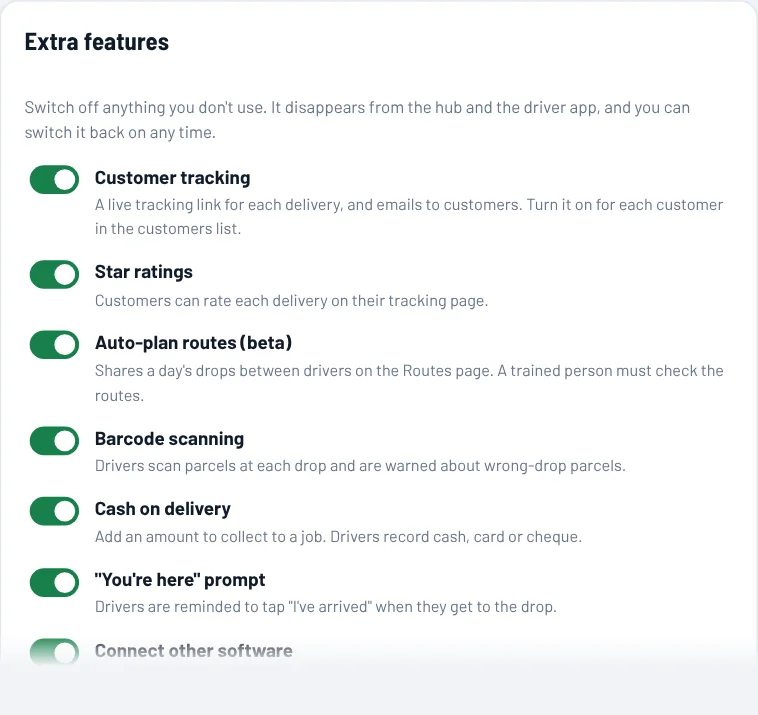
  • Switch off what you don't need: tracking, ratings, auto-plan, barcodes, cash on delivery and more. It disappears from the hub and the driver app
Settings for delivery type, words, proof of delivery and checks
Extra features switches: customer tracking, star ratings, auto-plan, barcodes, cash on delivery, you're here prompt, connect other software
Connect your other software

Jobs straight in, invoices straight out

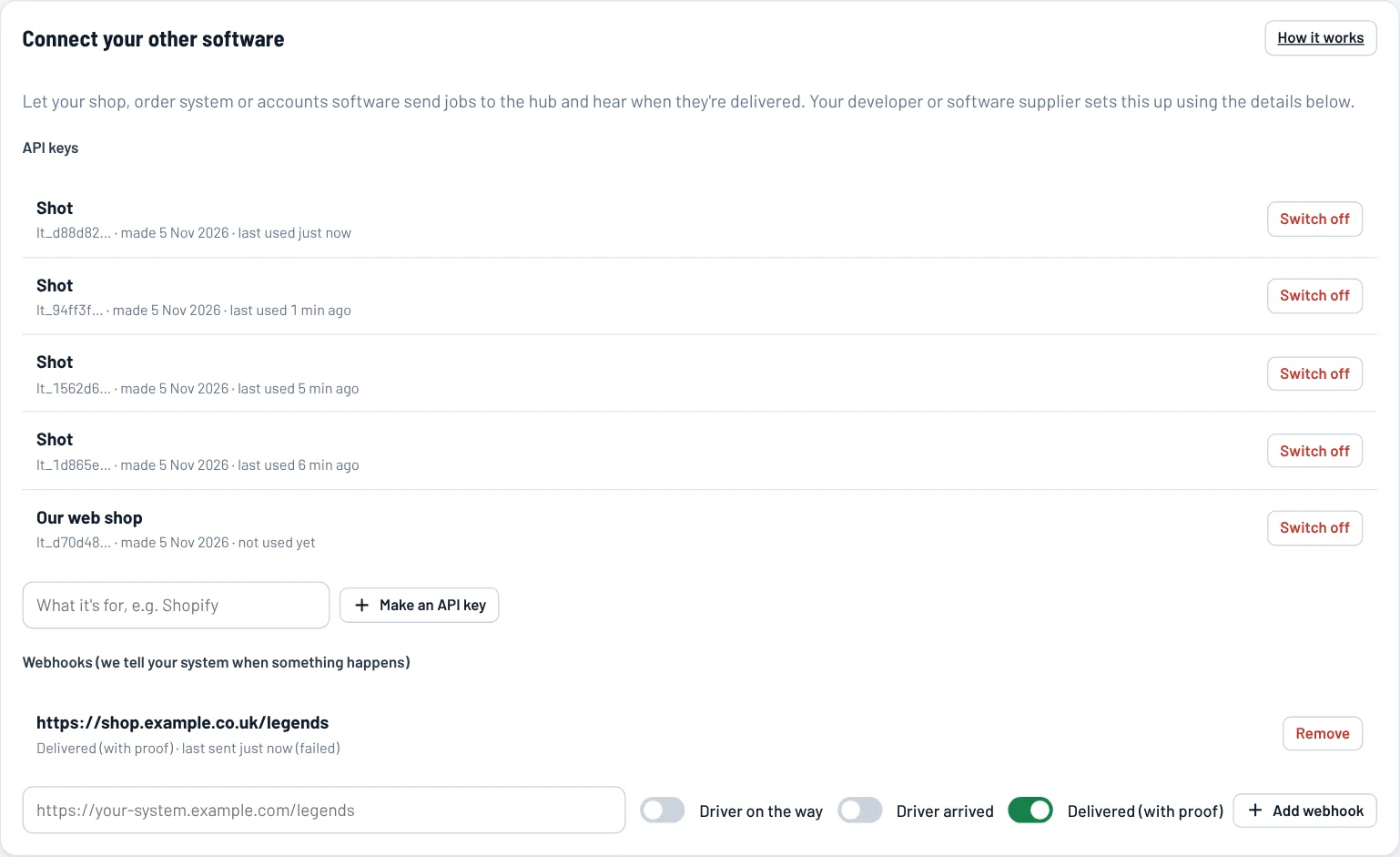
Your developer or software supplier can link your shop or order system to the hub. And with no developer at all, download a month's deliveries as invoices for Xero or QuickBooks.

  • API keys so your shop or order system can add jobs, with barcodes and cash to collect
  • Webhooks tell your system when a driver sets off, arrives and delivers
  • Invoices for Xero and QuickBooks: one invoice per customer, using your price per drop or per item, ready to import
  • Download deliveries between any two dates as a spreadsheet
  • Jobs that come in without a driver wait on Today until someone gives them out
  • Clear developer guide included
Connect your other software: API keys and webhooks
Your branding

Your logo, your colours

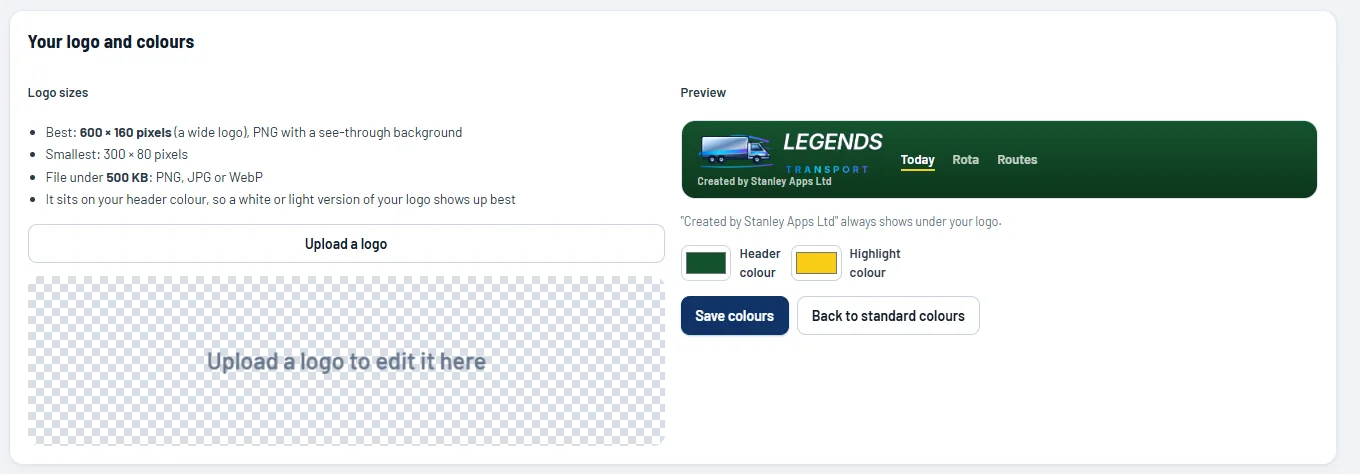
Upload your logo, size and position it, and pick your colours. Your team sees your brand across the office hub and the driver app.

  • Logo sizes shown up front: 600 × 160 pixels is best
  • Resize, move and add a background in the editor
  • Your header and highlight colours, with a live preview
Logo upload and colour picker with a preview
Driver app

A simple app your drivers will actually use

It runs in the phone's web browser and can be added to the home screen like an app. No app store needed, works on any iPhone or Android, with big, clear buttons. App Store and Google Play versions are on the way.

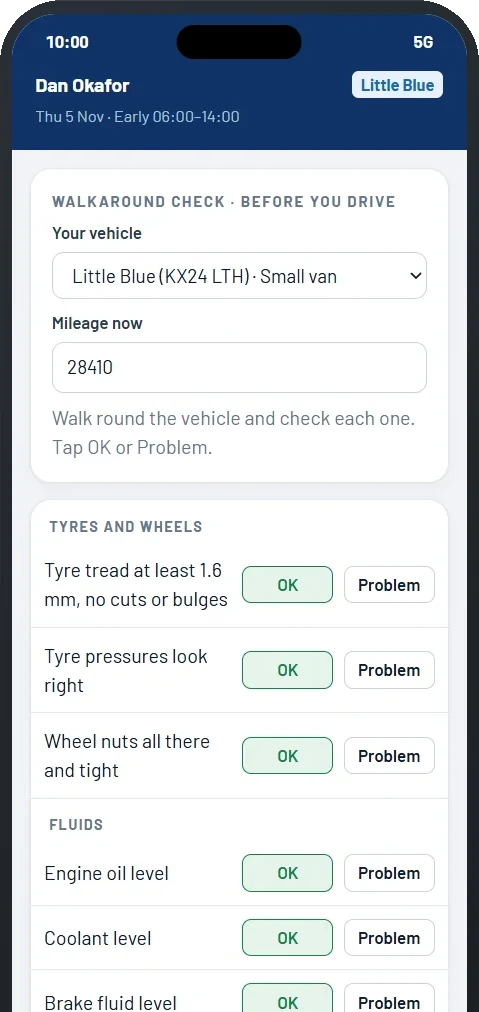
Walkaround vehicle check on a phone
Walkaround checkEvery legal check, before they drive
The round screen with the next drop
Their roundNext drop, notes and directions
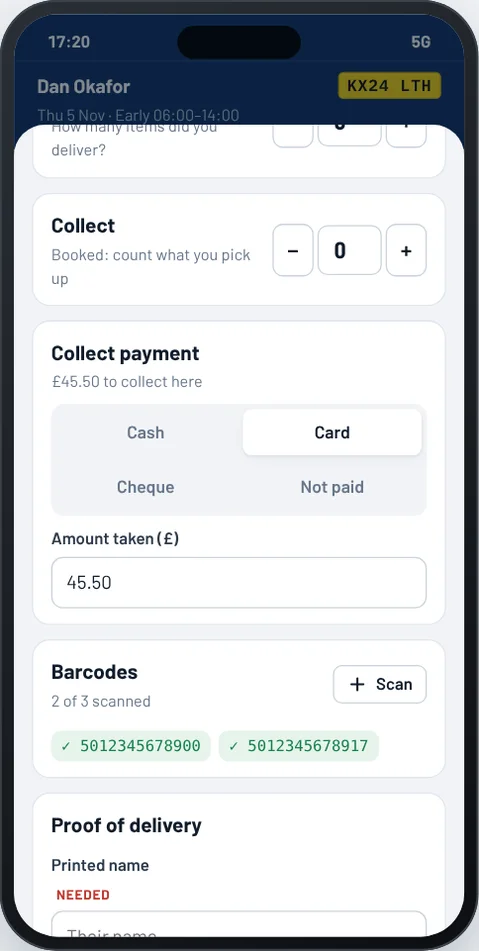
At the drop: collecting a card payment and scanning barcodes
Cash and barcodesPayment taken and parcels scanned
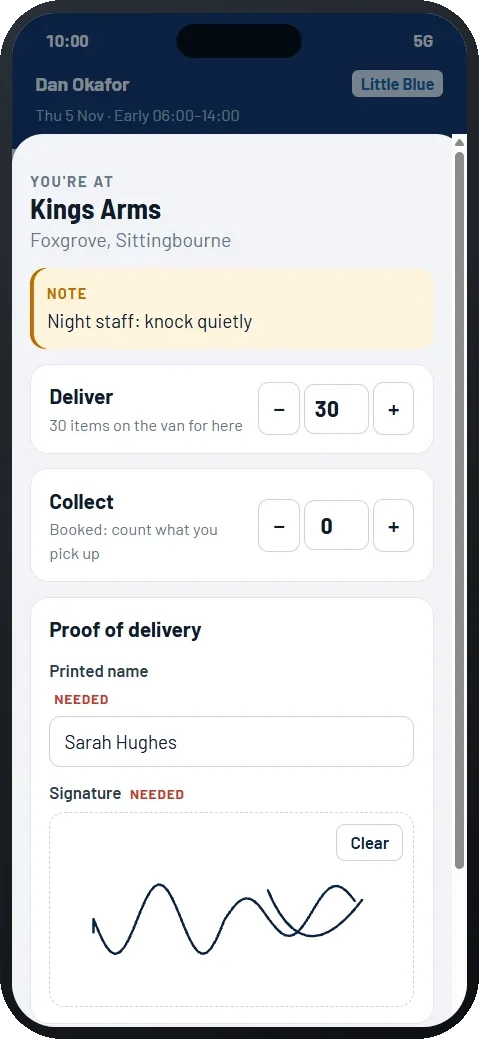
Deliver and collect with signature
Proof of deliverySignature, photo or safe place

Before they set off

  • Walkaround check: tyres, fluids, lights, brakes and more, with OK or Problem
  • Safety problems stop the van and tell the office straight away
  • Mileage and chiller temperature, if you use them
  • Count the load for each drop, or skip it if you don't know amounts
  • Doing the check clocks them in

On the road

  • "I'm on my way" and "I've arrived" keep the office map up to date, and email the customer
  • "You're here" prompt when they reach the drop, so arrivals aren't forgotten
  • Office notes, new jobs and announcements appear instantly, with a banner
  • Message the office from the app, for example "running 20 minutes late"
  • The screen stays on during the round, so drivers aren't unlocking their phone at every drop
  • One-tap directions in Google Maps
  • Location shared every 20 seconds while driving
  • Breaks pause location sharing until they carry on

At each drop

  • Deliver and collect counts, with a reason if anything comes back
  • Signature and printed name drawn on the screen
  • Photo from the phone's camera
  • Safe place, temperature and site safety, when your settings ask for them
  • Scan barcodes, with a warning if a parcel is for a different drop
  • Cash on delivery: cash, card or cheque, and how much was taken
  • Their rota, hours, holidays and clock in and out, all in the app
The full list

Everything you get

Every feature in one place, so you know exactly what you're getting.

Today and live map

  • Live GPS map of every van
  • Job x of y, next drop, distance and time
  • Arrival times with live traffic
  • Traffic colours on the map
  • Click a driver to highlight their van and road route
  • Daily totals and each driver's round
  • Proof of delivery viewer
  • Plan the day
  • Messages and announcements to drivers

Jobs and routes

  • Add jobs mid-shift from the map
  • Closest and going-that-way driver suggestions
  • Numbered routes with colours and days
  • Drag to reorder, or Best order
  • Real road miles and drive times
  • Back-to-base stops for part and part
  • Give a route to a driver for any day

Rota and holidays

  • Weekly rota with shift types
  • Cover for each day
  • Rest-break warnings
  • Holiday chart, 1 to 12 months
  • Allowances that count down
  • Requests from drivers' phones
  • Approve or decline in one tap

Fleet and safety

  • MOT, tax, service and insurance reminders
  • Vehicle names or registrations
  • Walkaround checks on the phone
  • Faults reported and marked fixed
  • Safety faults take the van off the road
  • Licence, points and CPC tracking
  • Wrong-licence warnings
  • Tachograph download reminders
  • One-click compliance pack for DVSA

Customers and proof

  • Delivered, collected, still with them
  • Six-week charts per customer
  • Spreadsheet import
  • Postcode lookup and map pins
  • Trusted or strict proof per customer
  • Signatures, photos, safe places
  • Chiller temperatures and site safety

People, hours and control

  • Logins for every member of staff
  • Clock in and out, automatic timesheets
  • Payroll download
  • Roles with exactly the access you choose
  • Your delivery type and your own words
  • Your logo and colours
  • Activity log of every change
  • Access log: who opened what, and when
  • Switch off features you don't use

Customer updates

  • "On the way" emails with a tracking link
  • Live map when they're the next drop
  • "Delivered" emails with who signed
  • Star ratings and comments
  • Tracking on or off per customer
  • Links expire after delivery
  • No texts to pay for

Extra tools

  • Auto-plan a whole day (beta)
  • Load limits and delivery windows
  • Barcode scanning at the drop
  • Cash on delivery
  • "You're here" prompt for drivers
  • API and webhooks for your shop or orders
  • Xero and QuickBooks invoice downloads
  • Screen stays on during the round
Peace of mind

Safe, private and looked after

Your data stays yours

Each company's information is kept completely separate, and staff only see what their role allows. An access log shows who opened what.

Secure logins

Every person has their own login. Passwords are stored scrambled, never as plain text, and new ones must be changed on first login.

Backed up

Everything is saved as it happens and can be restored to any point in the last 30 days. Photos and signatures are stored privately.

Real support

A UK company, Stanley Apps Ltd. If you ask for help, we can look at your hub with you, and every action we take shows in your activity log.

Questions

Good to know

Do drivers need to download an app?

No. Drivers go to the web address on their phone and log in. They can add it to their home screen so it opens like an app. It works on any modern iPhone or Android.

What if we don't know amounts until the van is loaded?

That's fine. Drivers count the load for each drop as they load, or you can switch counting off and they just record what they delivered.

Can we bring our customers across?

Yes. Paste or upload a spreadsheet of names, addresses, postcodes and delivery days, and the hub finds them on the map.

Can it match the words we use?

Yes. Items, parcels, cases or pallets; customers or sites; collections or returns. You choose, and the office hub and driver app both change.

How does live tracking respect drivers' privacy?

Location is only shared while a driver is out on their round, and it pauses when they start a break.

Do our customers get text messages?

No, updates go by email, so there are no text charges. Each email has a tracking link that works in any browser, and you choose which customers get them.

Can it link to our shop or order system?

Yes. Your developer or software supplier can send jobs in with an API key and hear back when they're delivered. Without a developer, download your deliveries as a spreadsheet for your accounts.

What if DVSA asks to see our records?

Press Compliance pack on the Fleet page. You get one ZIP file with a summary, every walkaround check, defect and repair, your drivers' licence checks, hours worked and tachograph files, for any dates you choose.

Does it work with Xero or QuickBooks?

Yes. Put a price per drop or per item on each customer, then download a month's deliveries as invoices in Xero's or QuickBooks' import format. They come in as drafts for you to check and send.

We don't need everything. Can we switch things off?

Yes. Tracking, ratings, auto-plan, barcode scanning, cash on delivery, driver messages and more can each be switched off in Settings, and they disappear from the hub and the driver app.

What does it cost?

Get in touch for a quick demo and a price for your size of fleet.

See it working with your own rounds

We'll show you a live demo and set up your company with your delivery type, customers and vehicles.

Email hello@stanleyappsltd.com